Chapter 18: Moving Forward
You've come a long way. At the start of this tutorial, you believed "I can't code." Now you understand that coding with AI is a partnership where you provide direction and judgment while AI provides implementation and speed. That shift in mindset is everything.
Growing Your Skills
Learning to code with AI follows a natural progression. Everyone starts at the beginning and moves forward through practice.
 {: .chapter-diagram}
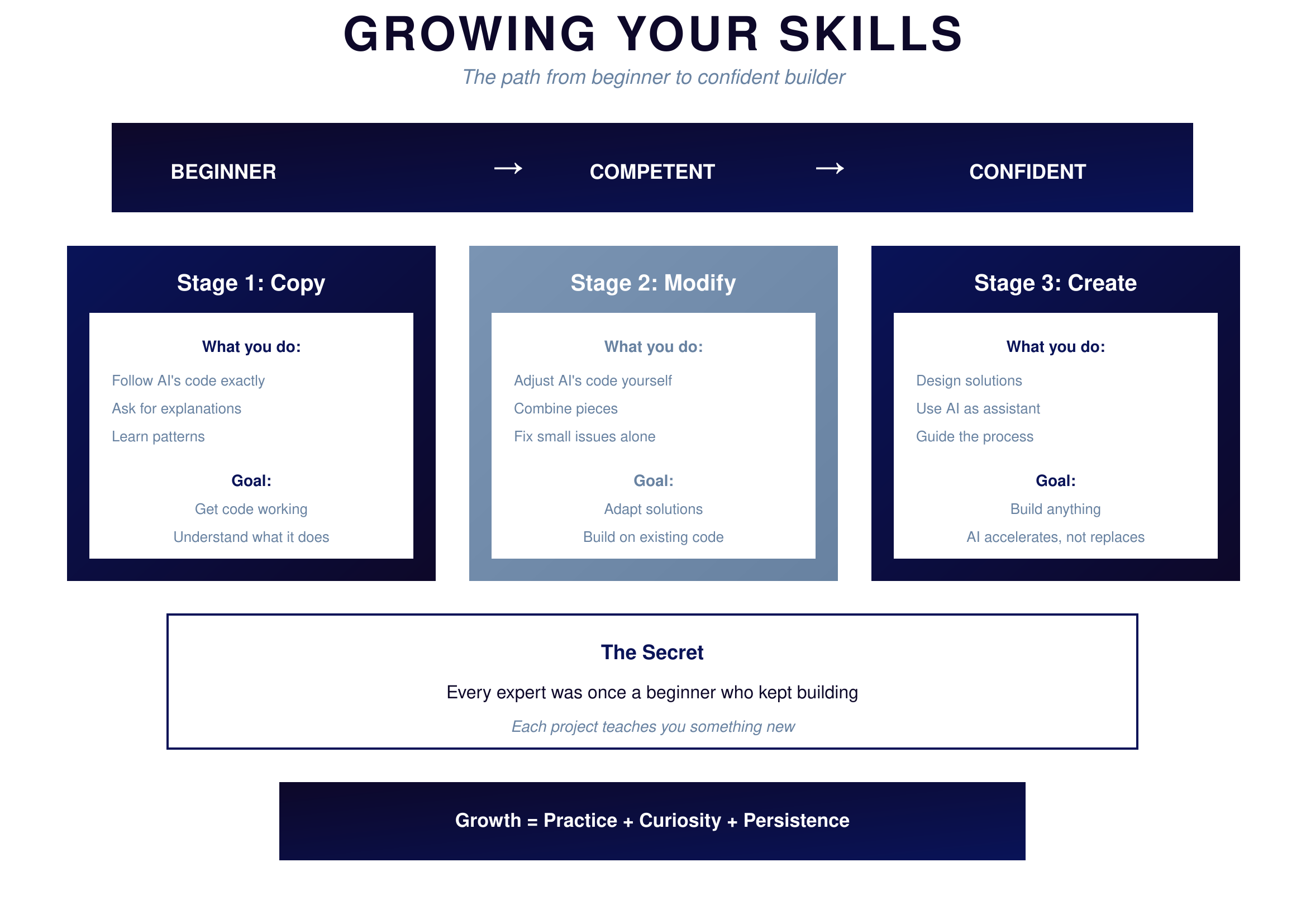
Figure 18.1: Growing Your Skills — The progression
{: .diagram-caption}
{: .chapter-diagram}
Figure 18.1: Growing Your Skills — The progression
{: .diagram-caption}
In the copy stage, you follow AI's code exactly. You ask for explanations constantly. You learn patterns by seeing them repeatedly. Your goal is simply to get code working and understand what it does. There's no shame in this stage—it's where everyone begins.
In the modify stage, you start adjusting AI's code yourself. You combine pieces from different solutions. You fix small issues without asking for help. Your goal is adapting solutions and building on existing code. You're gaining independence.
In the create stage, you design solutions from scratch. You use AI as an assistant rather than a driver. You guide the process and make architectural decisions. Your goal is building anything you can imagine, with AI accelerating your work rather than replacing your thinking.
You'll move through these stages naturally as you build more projects. Each project teaches you something new. The progression isn't linear—you might be at the Create stage for simple scripts but back at Copy for a new domain. That's normal.
Resources
When you get stuck, knowing where to find help matters. Build your toolkit of resources.
 {: .chapter-diagram}
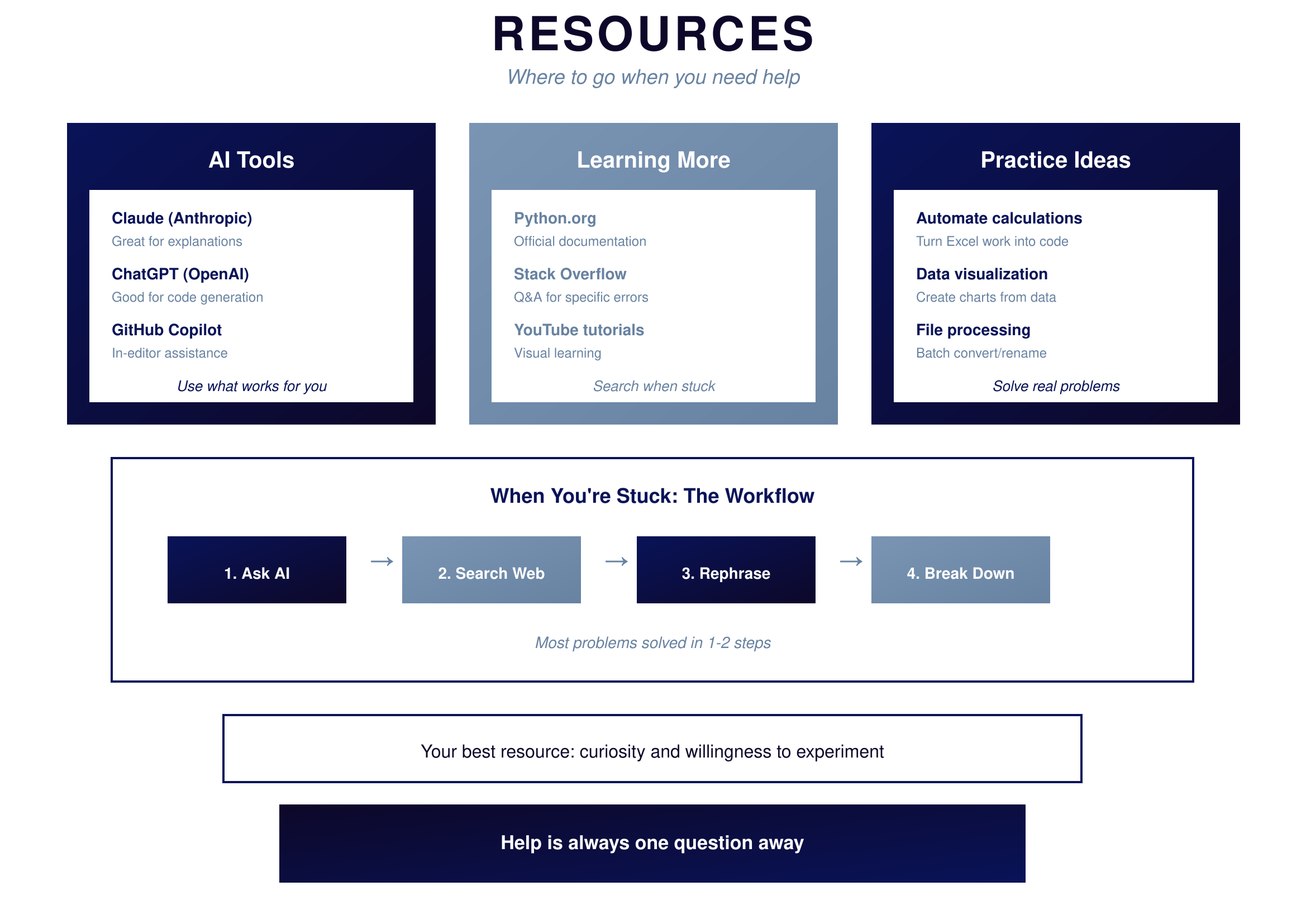
Figure 18.2: Resources — Where to get help
{: .diagram-caption}
{: .chapter-diagram}
Figure 18.2: Resources — Where to get help
{: .diagram-caption}
For AI assistance, Claude excels at explanations and helping you understand concepts deeply. ChatGPT is excellent for code generation and trying different approaches. GitHub Copilot provides in-editor assistance as you type. Try them all and use what works best for your style.
For learning more, Python.org has the official documentation for when you need precise details. Stack Overflow provides answers to specific error messages and edge cases. YouTube tutorials offer visual learning for complex topics. Search when you're stuck on something specific.
For practice, automate your calculations by turning Excel work into code. Create visualizations by building charts from your data. Process files in batches by writing scripts for conversion and renaming. Solve real problems that matter to you—motivation comes from utility.
When you're stuck, follow this workflow: first ask AI, then search the web, then rephrase your question differently, and finally break the problem into smaller pieces. Most problems are solved in the first two steps.
The Journey
Take a moment to appreciate how far you've traveled.
 {: .chapter-diagram}
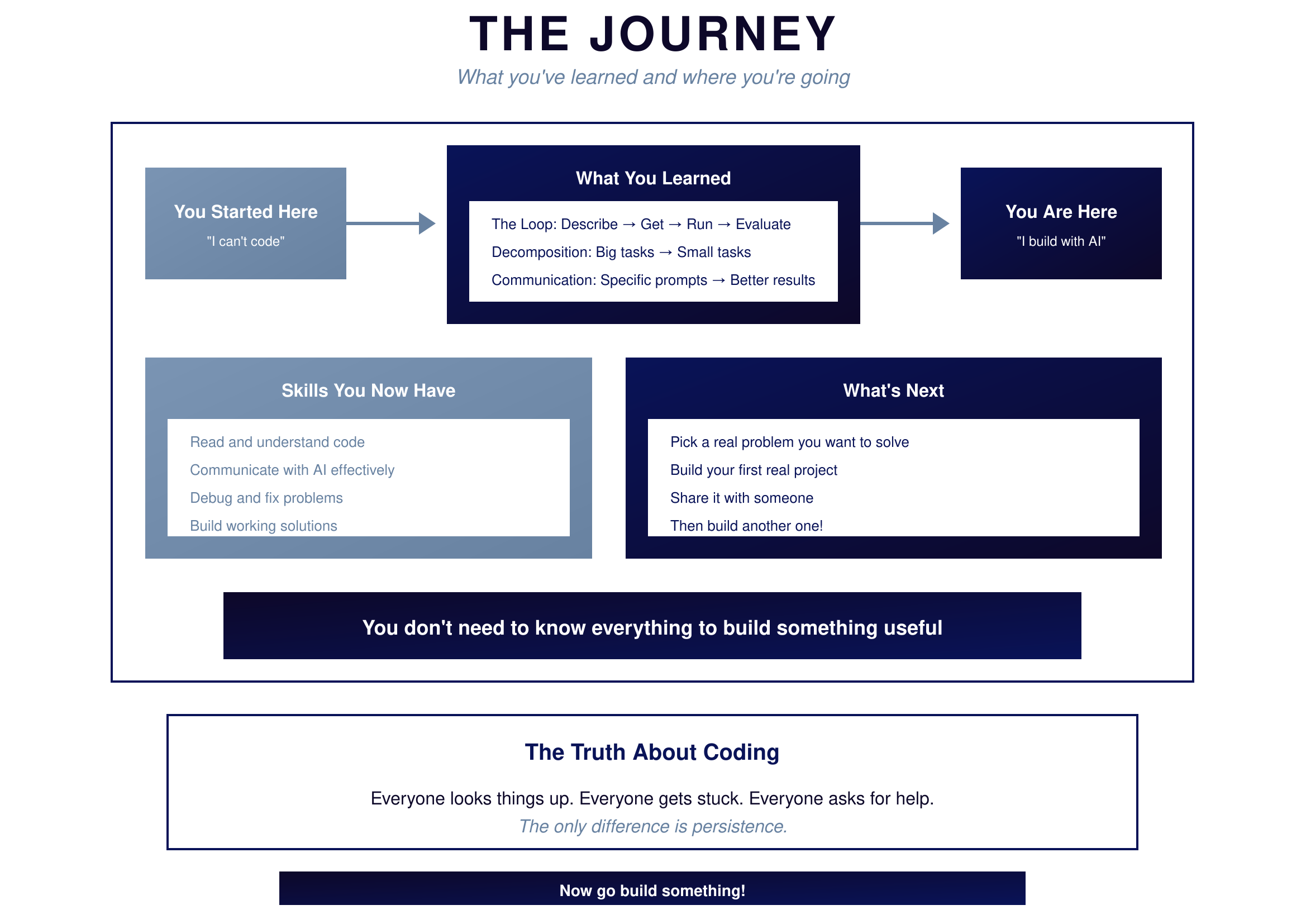
Figure 18.3: The Journey — How far you've come
{: .diagram-caption}
{: .chapter-diagram}
Figure 18.3: The Journey — How far you've come
{: .diagram-caption}
You started here saying "I can't code."
What you learned: the Loop—describe, get, run, evaluate—is how all AI-assisted coding works. Decomposition breaks big tasks into small tasks that AI can handle. Communication matters because specific prompts produce better results than vague ones.
You are here now: "I build with AI."
Skills you now have: you can read and understand code even if you didn't write it. You can communicate with AI effectively to get what you need. You can debug and fix problems when things go wrong. You can build working solutions that solve real problems.
What's next: pick a real problem you want to solve. Build your first real project outside this tutorial. Share it with someone. Then build another one. And another. Each project makes you better.
Try It Yourself
Start your journey:
- "I'm new to coding. Create a simple script that counts words in a text"
- "I have a CSV file with sales data. How do I calculate the total?"
- "Help me automate renaming files in a folder"
- "Create a simple quiz game that asks 5 questions"
- "Build a script that reminds me of tasks at specific times"
- "I want to analyze my expenses. Where do I start?"
- "What's a good first project for someone who wants to automate their work?"
Key Takeaways
Everything from this tutorial in one place.
 {: .chapter-diagram}
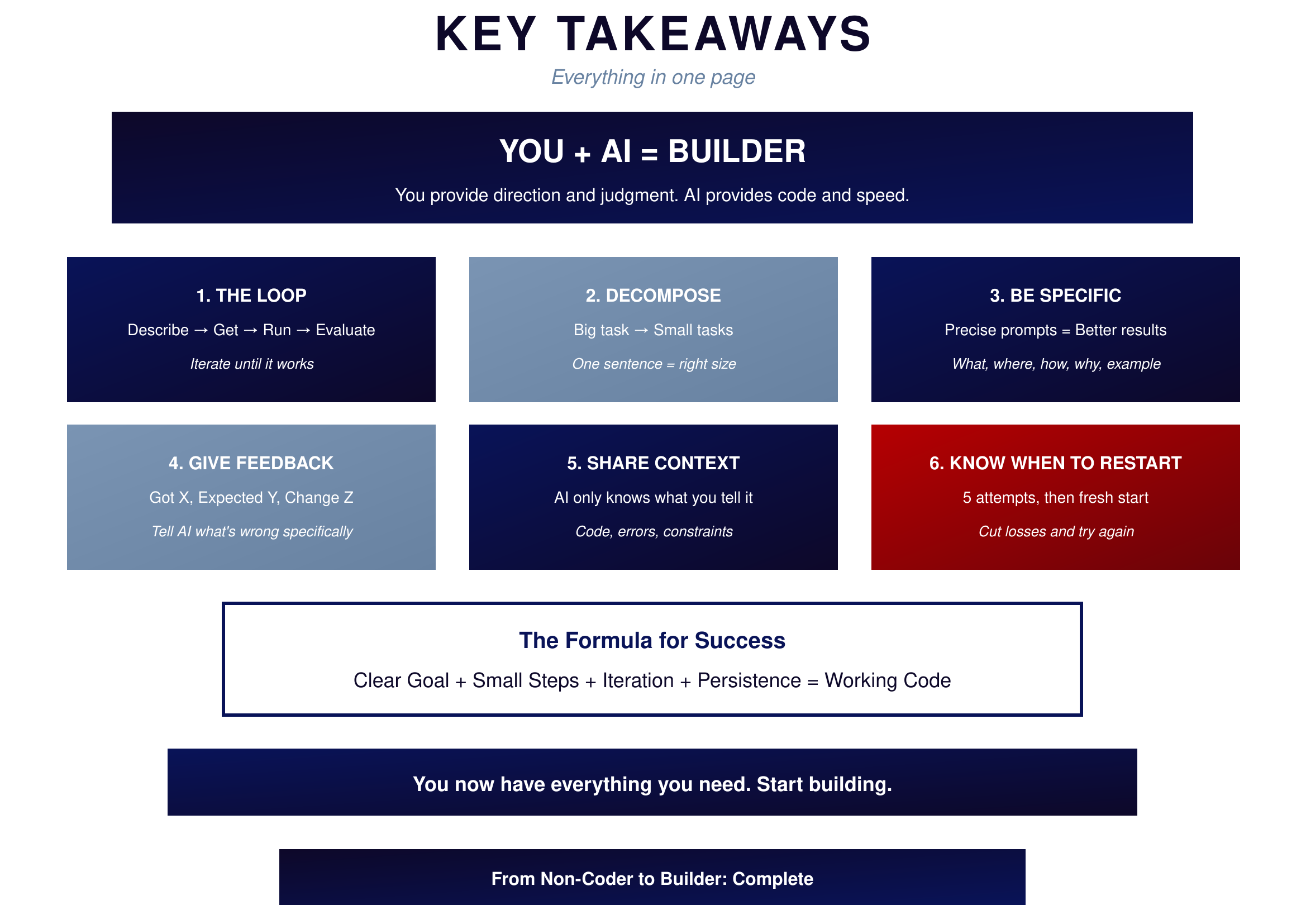
Figure 18.4: Key Takeaways — Everything summarized
{: .diagram-caption}
{: .chapter-diagram}
Figure 18.4: Key Takeaways — Everything summarized
{: .diagram-caption}
The first lesson is that you plus AI equals builder. You provide direction and judgment while AI provides code and speed. Together you can build anything.
The Loop is the foundation of everything. Describe what you want, get code from AI, run it to see results, evaluate whether it works, and iterate until it does. This cycle powers all AI-assisted development.
Decomposition turns impossible tasks into achievable ones. If you can't describe a task in one sentence, it's too big. Break it down until each piece is simple enough for AI to handle.
Specificity determines quality. Precise prompts produce better results than vague ones. Include what you want, where it fits, how it should work, why it's needed, and an example if helpful.
Feedback drives improvement. When results aren't right, use the formula: "Got X, expected Y, change Z." Tell AI specifically what's wrong and what you want different.
Context enables understanding. AI only knows what you tell it, so include relevant code, error messages, and constraints. More context leads to better solutions.
Knowing when to restart saves time. After five failed attempts with the same approach, start fresh. Sometimes a clean slate is faster than fixing broken code.
The formula for success ties everything together: clear goal plus small steps plus iteration plus persistence equals working code.
You're Ready
You don't need to know everything to build something useful. You don't need to memorize syntax—that's what AI is for. You don't need permission from anyone to start creating.
What you need is what you now have: understanding of how the partnership works, skills to communicate effectively with AI, ability to break down problems and verify solutions, and the confidence that comes from completing this tutorial.
The rest comes from doing. Pick a real problem. Build a solution. Share it. Learn from the experience. Then do it again.
That's the whole secret. There is no shortcut. There is no magic. There's just you, AI, and the willingness to keep building until it works.
Start building.