Chapter 2: The Loop
This is how every coding session with AI actually works. Memorize this loop.
 {: .chapter-diagram}
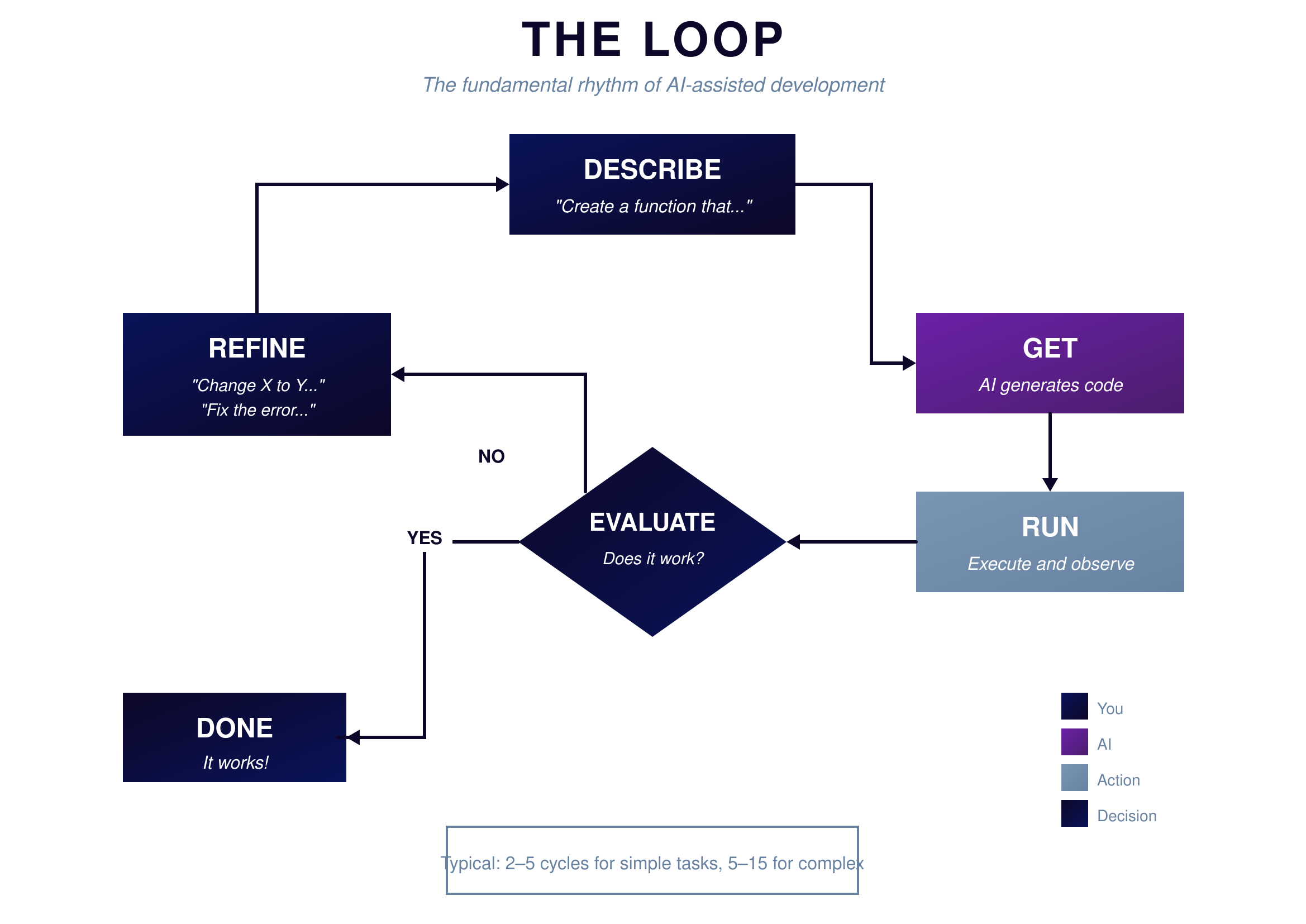
Figure 2.1: The Loop — Describe, Get, Run, Evaluate, Repeat
{: .diagram-caption}
{: .chapter-diagram}
Figure 2.1: The Loop — Describe, Get, Run, Evaluate, Repeat
{: .diagram-caption}
The loop has five steps, and you'll repeat them constantly. First, you DESCRIBE what you want to AI. Something like "Create a function that calculates bolt stress from force and area." Then AI gives you code—the GET step. The code might be perfect. It probably won't be.
Next comes the critical step most beginners skip: RUN. You actually execute the code. Not just look at it. Not just assume it works. Run it with real inputs and see what happens.
Then you EVALUATE. Does it work? Does it do what you wanted? This is where your domain expertise matters most. AI doesn't know if the output makes sense for your application—you do. A calculation that returns impossible values might be syntactically correct but practically meaningless.
Finally, you make a decision: Done or Refine? If it works, you're done. Move on. If it doesn't, you go back to DESCRIBE with more information. "The function works but returns negative values when force is negative. Add validation to reject negative inputs." This loop might run once. It might run ten times. That's normal. Every professional developer works this way—the only difference is they've done more loops.
The Draft Mindset
Here's what most beginners get wrong: they expect perfection on the first try.
 {: .chapter-diagram}
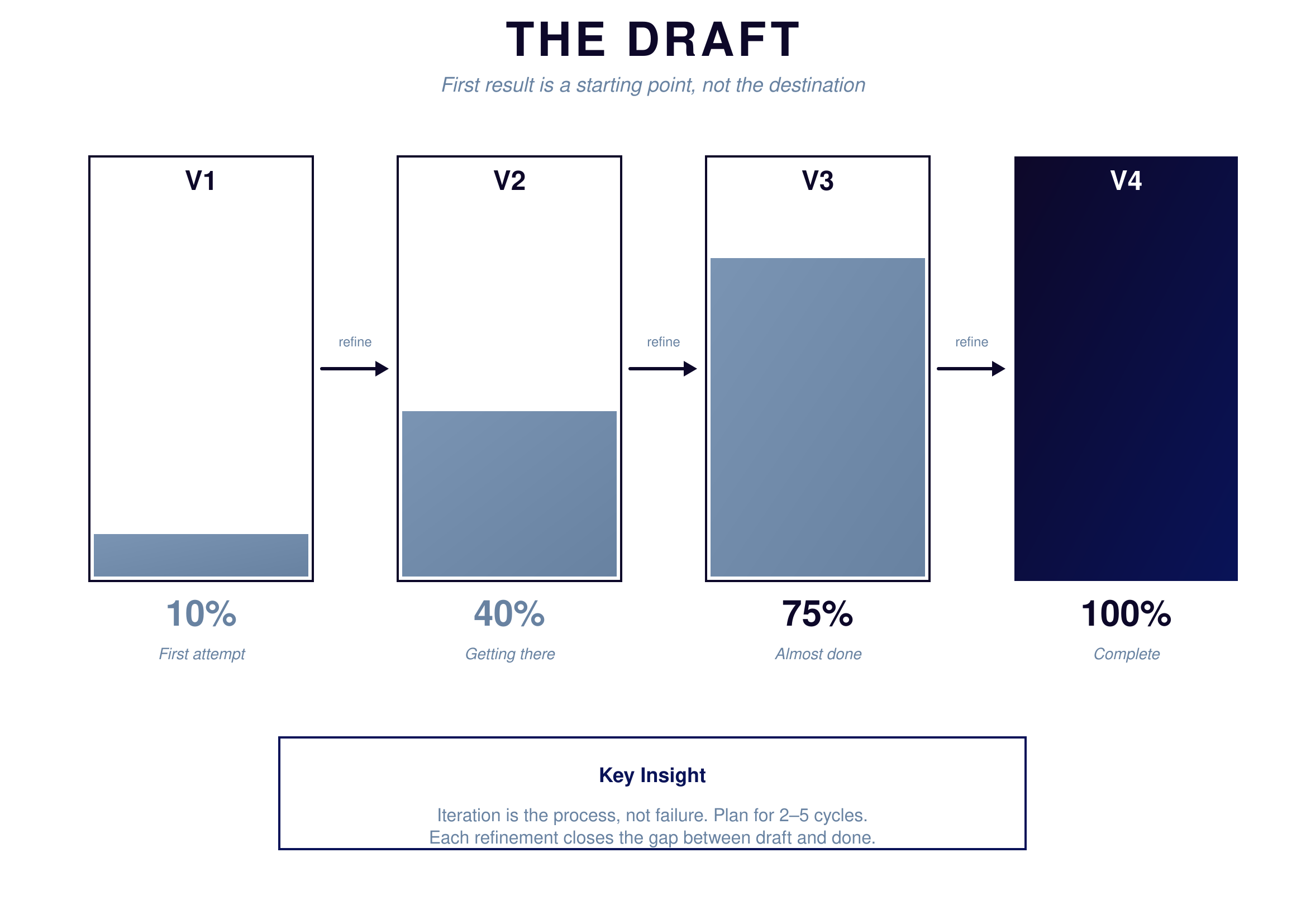
Figure 2.2: The Draft — Progress through iteration
{: .diagram-caption}
{: .chapter-diagram}
Figure 2.2: The Draft — Progress through iteration
{: .diagram-caption}
Look at this progression. Version 1 is maybe 10% of what you want. It's rough. It might not even run. That's fine. That's the draft. Version 2 gets you to 40%—now the basic structure works, but maybe the output format is wrong. Version 3 reaches 75%—it's doing the right calculation but doesn't handle edge cases. Version 4 hits 100%. It works. Ship it.
When you write a report, do you expect the first draft to be perfect? Of course not. You write, review, revise, repeat. Code works the same way. The first output from AI is a starting point, not a final answer. Your job is to test it, identify what's wrong, and guide the refinement.
This mindset shift is crucial. Stop asking "why didn't AI give me perfect code?" and start asking "what do I need to tell AI to make this better?"
Try It Yourself
Practice the loop with these prompts:
- "Create a function that calculates the area of a circle"
- "The function returns 0 for all inputs—what's wrong?"
- "Now add validation to reject negative radius values"
- "Change the output to include the units (square meters)"
- "The code crashes when I enter text instead of a number—fix it"
- "Add a second function that calculates circumference"
Key Takeaway
The loop is your fundamental workflow. Every time you work with AI, you'll describe what you want, get code, run it, evaluate whether it works, and either finish or refine. Expect multiple iterations. Plan for them. The goal isn't perfect code on the first try—it's working code after enough loops.
In the next chapter, we'll categorize all the different types of operations you can perform in this loop.