Chapter 10: Debugging
Your code doesn't work. Here's the systematic approach to fixing it.
 {: .chapter-diagram}
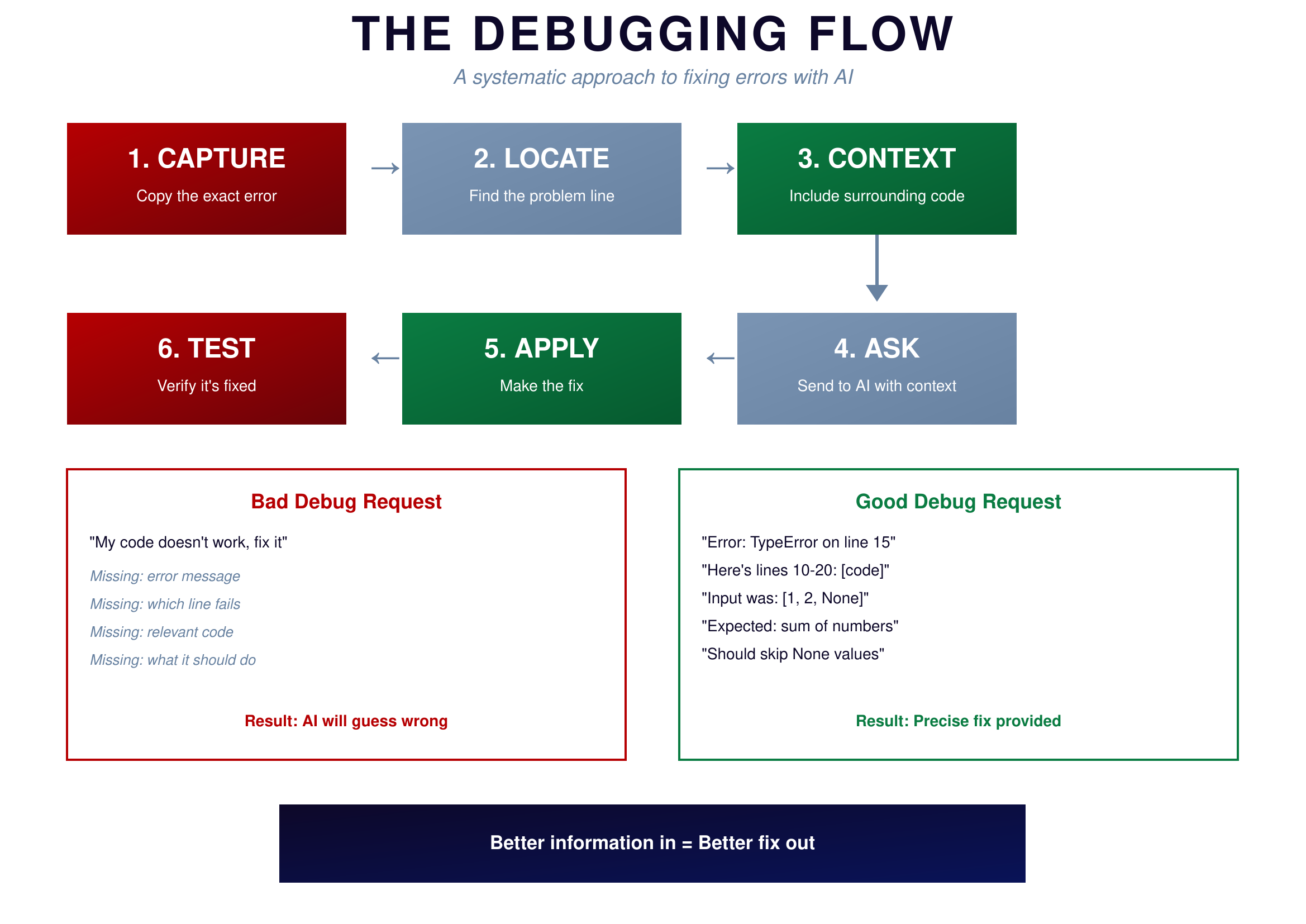
Figure 10.1: The Debugging Flow — A systematic approach
{: .diagram-caption}
{: .chapter-diagram}
Figure 10.1: The Debugging Flow — A systematic approach
{: .diagram-caption}
Debugging follows a six-step process. First, CAPTURE the exact error message—all of it, not a summary, the actual text. Second, LOCATE the problem line; error messages usually tell you where to look. Third, gather CONTEXT by including the surrounding code; AI needs to see what's happening around the error. Fourth, ASK AI with all this context assembled. Fifth, APPLY the fix AI provides. Sixth, TEST by running the code again to verify it's actually fixed.
The difference between bad and good debug requests is stark. A bad request says "My code doesn't work, fix it"—missing the error message, the failing line, the relevant code, and what the code should do. AI will guess wrong. A good request says "Error: TypeError on line 15. Here's lines 10-20: [code]. Input was: [1, 2, None]. Expected: sum of numbers. Should skip None values." This has the exact error, location, code context, input data, and expected behavior. AI can provide a precise fix.
Error Types
Understanding error types helps you describe them better to AI.
 {: .chapter-diagram}
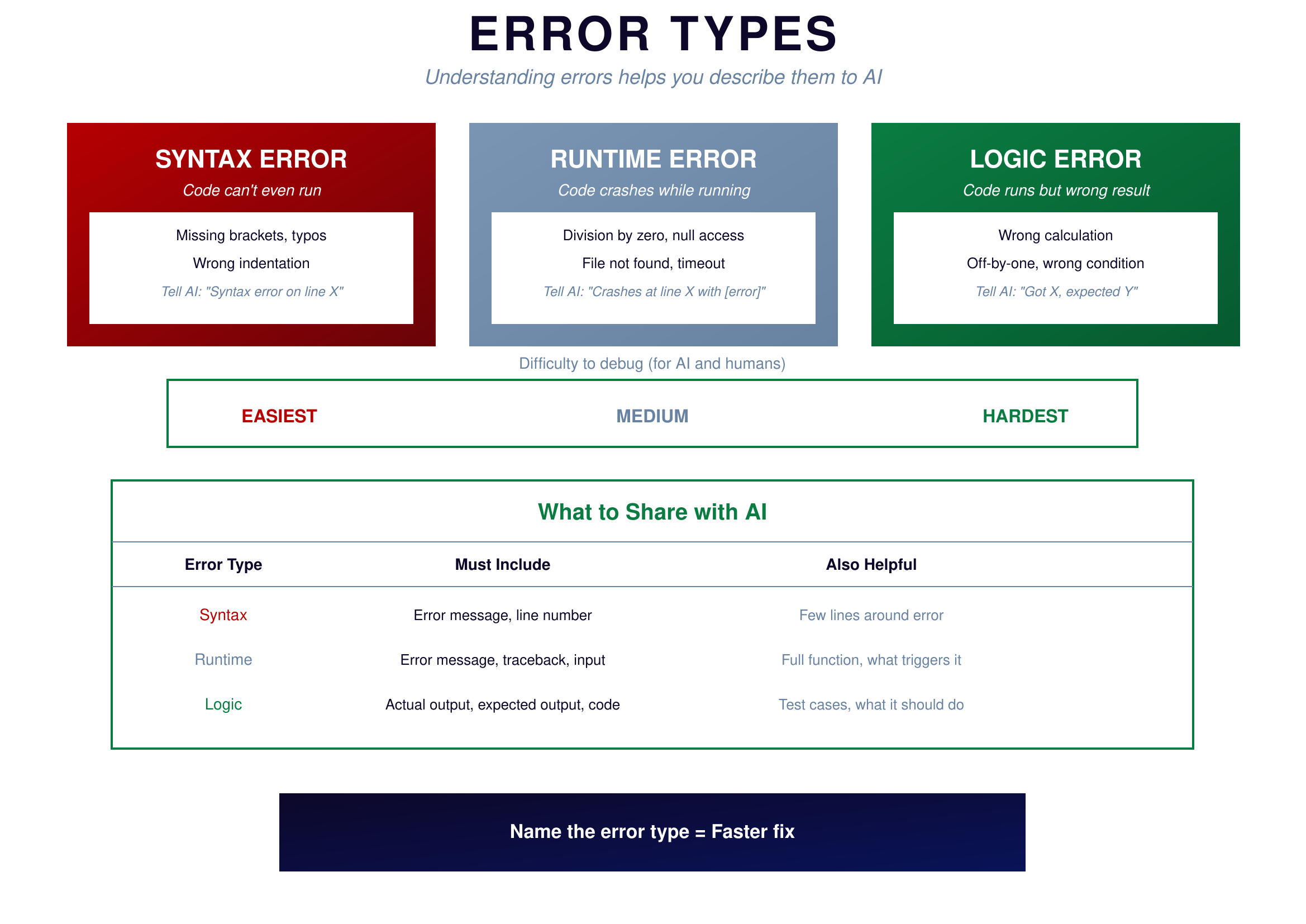
Figure 10.2: Error Types — Know your errors
{: .diagram-caption}
{: .chapter-diagram}
Figure 10.2: Error Types — Know your errors
{: .diagram-caption}
Syntax errors mean the code can't even run. These include missing brackets, typos, and wrong indentation. When you see these, tell AI "Syntax error on line X: [error message]." These are the easiest to fix—usually one character or line needs correction.
Runtime errors mean the code starts but crashes midway through execution. Examples include division by zero, accessing null values, and file not found. Tell AI "Crashes at line X with [error]. Input was [data]." These are medium difficulty because you need to understand what triggered the crash.
Logic errors are the trickiest—the code runs without crashing but gives wrong results. Examples include wrong calculations, off-by-one errors, and incorrect conditions. Tell AI "Got [X], expected [Y]. Here's the code." These are hardest because there's no error message to guide you; you have to spot what's wrong in code that Python thinks is perfectly fine.
Try It Yourself
Practice debugging prompts:
- "SyntaxError: unexpected EOF. Here's my code: [paste]. What's missing?"
- "TypeError: 'NoneType' has no len() at line 8. Here's lines 5-12: [paste]. Input was: [data]"
- "The code runs but returns 15 instead of 120. Here's the function: [paste]"
- "IndexError: list index out of range. The list has 5 items. Here's the loop: [paste]"
- "FileNotFoundError for 'data.csv'. I'm running the script from /home/user/project/. Where should the file be?"
- "The code works for small inputs but crashes with 1000 items. How can I debug this?"
Key Takeaway
Debugging is a systematic process, not random guessing. Capture the error exactly. Locate where it happens. Gather context around the problem. Ask AI with all this information. Apply the fix. Test to confirm. The more information you provide at step 4, the faster you get to working code.
In the next chapter, we'll tackle what to do when you're completely stuck and nothing seems to work.