Chapter 7: Context
This concept will change how you work with AI.
 {: .chapter-diagram}
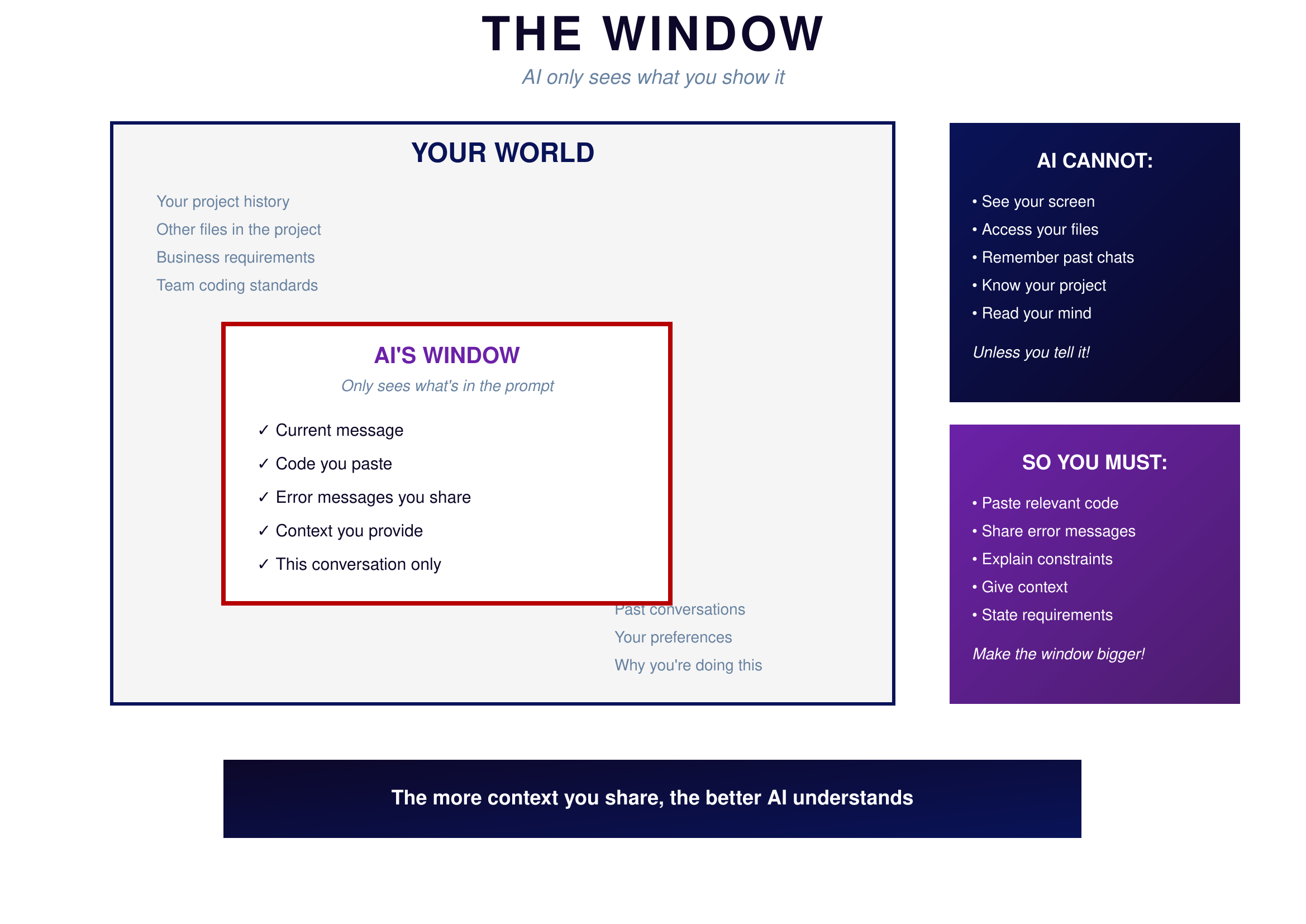
Figure 7.1: The Window — AI only sees what's in the prompt
{: .diagram-caption}
{: .chapter-diagram}
Figure 7.1: The Window — AI only sees what's in the prompt
{: .diagram-caption}
Look at this diagram. The large box represents YOUR WORLD—everything you know about your project, your history, your requirements, your preferences. The small box inside represents AI'S WINDOW—what AI can actually see.
AI cannot see your screen. It cannot access your files. It doesn't remember your past conversations. It doesn't know your project. It cannot read your mind. Unless you tell it, AI has no access to any of the context you take for granted.
All that information floating outside the window—your project history, other files, business requirements, team coding standards, past conversations, your preferences, why you're doing this—none of it exists for AI until you share it.
This is why vague prompts fail. When you say "fix the function," you're assuming AI knows which function, what's wrong with it, and how you want it fixed. AI doesn't know any of that. You must explicitly share relevant code, error messages, constraints, and requirements. Make the window bigger. The more context you share, the better AI understands.
What to Share
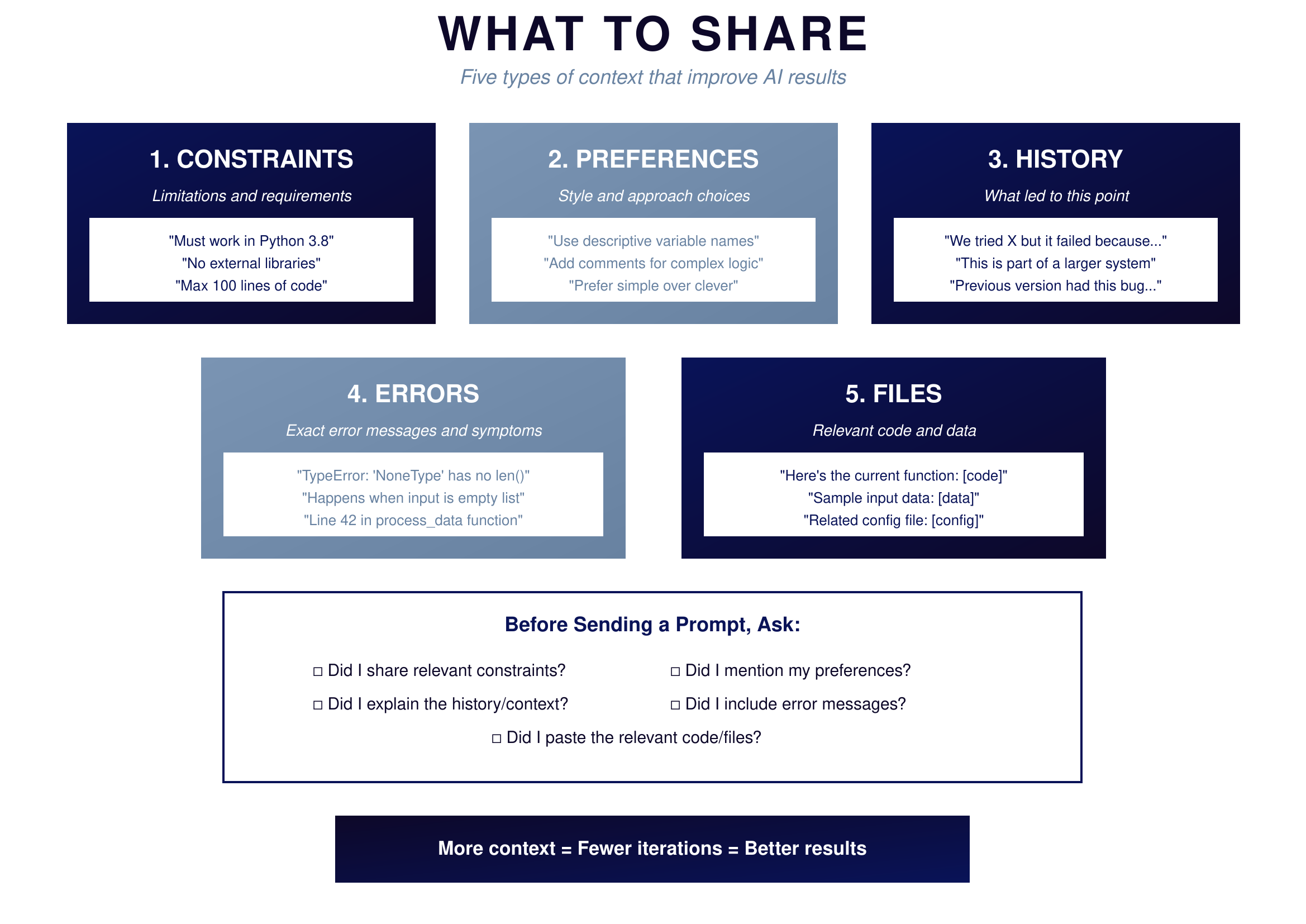
There are five types of context that dramatically improve AI results.
 {: .chapter-diagram}
Figure 7.2: What to Share — Five types of context
{: .diagram-caption}
{: .chapter-diagram}
Figure 7.2: What to Share — Five types of context
{: .diagram-caption}
Constraints are the limitations and requirements that bound your solution. Saying "must work in Python 3.8" eliminates solutions using newer features. Specifying "no external libraries" focuses AI on standard library solutions. Setting "max 100 lines of code" gives a size target. Without knowing your constraints, AI might give you something technically correct but unusable in your actual situation.
Preferences are your style and approach choices. Asking for "descriptive variable names" shapes how AI writes code. Requesting "comments for complex logic" determines documentation level. Saying "prefer simple over clever" guides AI toward maintainable solutions. When you share preferences, you get code that fits your standards rather than AI's defaults.
History is what led to this point in your project. Mentioning "we tried X but it failed because Y" prevents AI from suggesting the same failed approach. Noting "this is part of a larger system" helps AI understand scope. Sharing "previous version had this bug" gives AI context about what to avoid. History prevents you from going in circles.
Errors are the exact messages and symptoms you're seeing. Pasting "TypeError: 'NoneType' has no len()" gives AI the specific error to diagnose. Describing "happens when input is empty list" identifies the trigger. Saying "line 42 in process_data function" pinpoints the location. The more precise your error description, the faster AI can fix it.
Files are the relevant code and data for your task. Including "here's the current function: [code]" shows AI what you're working with. Providing "sample input data: [data]" helps AI understand the format. Attaching "related config file: [config]" gives system context. AI can't help with code it can't see.
Try It Yourself
Practice providing context:
- "Here's my function [paste code]. It should return X but returns Y. The input data looks like [example]."
- "I'm using Python 3.8 with no external libraries. Create a function that..."
- "This code must run in under 1 second for 10,000 items. Optimize this function: [paste]"
- "We tried using recursion but hit the stack limit. Suggest an iterative approach."
- "Here's the error: [paste full error]. Here's the code: [paste]. Here's the input: [paste]."
- "Match this code style: [paste example]. Now write a new function that..."
Key Takeaway
Every time you prompt AI, remember the window. AI only sees what you put in front of it. Before you hit send, ask yourself: Did I share the constraints? The preferences? The history? The errors? The relevant code? The more context you provide, the closer AI gets to exactly what you need on the first try.
In the next chapter, we'll learn when to stop iterating and start fresh instead.